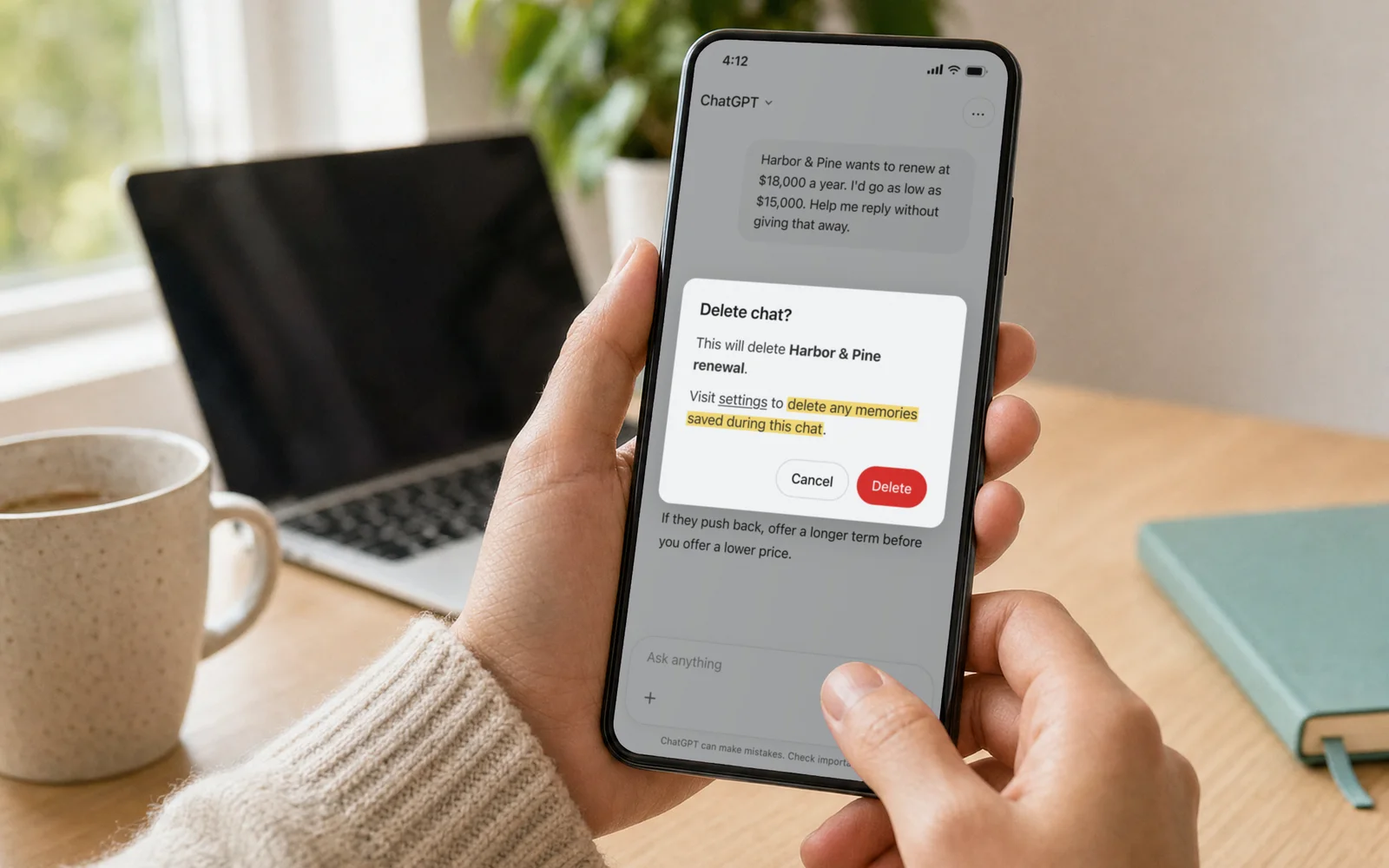
You mentioned a client to ChatGPT months ago, then deleted the chat to be safe. ChatGPT may still remember the client.
OpenAI’s own help page says deleting a chat doesn’t automatically delete a memory ChatGPT saved from it, because saved memories are stored separately from your chat history. The chat leaves your list, and what ChatGPT learned from it can stay behind and keep shaping its answers.
So deleting the chat isn’t enough. You have to find the memory and delete it too, and even then OpenAI says it may keep logs of deleted memories for up to 30 days.
We’re the team behind Emerge.ai, a private AI app, and we think you should know what an AI company keeps about your business. Here’s what we do differently.
We checked all of this against OpenAI’s own help pages on November 12, 2026. The picture above is a recreated screen; the names and highlights are ours.
Here to clean up? Skip to clearing what ChatGPT already knows.
What ChatGPT keeps after you delete a chat
ChatGPT remembers in more than one way, and deleting a chat removes only one of them.
| What you do | What can stay behind |
|---|---|
| Delete a chat | Any saved memory ChatGPT made from it |
| Delete a saved memory | Logs of it, for up to 30 days |
| Turn off Reference chat history | What it learned from past chats, until it’s deleted within 30 days |
| Choose “Delete and turn off memory” | Your past chats, which this doesn’t delete |
| Disconnect an app such as Gmail | Past chats that already used what was in it |
You don’t have to ask ChatGPT to remember anything. OpenAI says its improved memory continually updates a summary of what’s relevant about you. In a study Futurism reported on October 25, researchers who collected 80 people’s ChatGPT data found that ChatGPT itself had created 96% of the 2,050 memories they examined, and about half held what the researchers called psychological insights. It’s a small sample, and OpenAI has updated its memory system since.
Why a memory you can’t see is a business problem
Think about what passes through a work chat in a month. A client’s name and their fee. An employee’s performance problem. The number you’d accept for the business, or a contract you promised to keep confidential.
Any of it can become a memory you never asked for, and OpenAI says the memory summary won’t include everything ChatGPT remembers. ChatGPT uses what it remembers in later chats, so a detail from one conversation can turn up while you’re working on something else.
If it’s a personal ChatGPT account someone on your team signed up for, all of it walks out the door with them. You can’t open it, and you can’t make it forget. A company ChatGPT plan gives the business some control, but only over ChatGPT.
What we do differently at Emerge.ai
We built Emerge.ai so a small business can do its AI work in one private app. Think of it like a VPN for AI. You use the leading AI models through Emerge.ai, not separate accounts with each AI company.
That’s one app to look after, instead of a ChatGPT memory here, another AI company’s history there and an account someone set up last spring. Individual Pro adds up to 3 Clouds, each a private space for its own chats, projects and files, so your work stays apart. For a team, Emerge.ai Business puts up to 25 people on one plan, with one shared usage pool, up to 10 shared Clouds (workspaces your team shares) and roles and admin controls. See Business plans.
We’re an online service too, and the model you pick still has to process what you send, so think about what you paste into any AI app, ours included. If you’d like one place for the leading AI models, you can start free and upgrade when you need more.
New to Emerge.ai? New accounts can get Individual Pro for $10/mo for the first 3 months. Look for the offer in Emerge.ai on the web or desktop during your first week. Then $20/mo plus applicable tax, renewing monthly until you cancel.
Clear out what ChatGPT already remembers
Whatever you use next, it’s worth cleaning up what ChatGPT already has on you.
- Look first. On the web, go to Settings → Personalization → Memory and read the memory summary or your saved memories. The summary is a high-level view, so also ask ChatGPT to list everything it remembers about you.
- Delete the memory and the chat. Remove the memory from the summary or the list, then delete the chat it came from, archived chats included, because one doesn’t take the other with it. If a saved file or a connected app holds the same detail, remove it there too.
- Turn off Reference chat history if you don’t want past chats used. OpenAI says what it learned from them is then deleted within 30 days.
- Don’t count on Temporary Chat to forget. It doesn’t save new memories, and choosing Unpersonalized before you start keeps your old ones out of it. But OpenAI says it may keep a copy for up to 30 days for safety, and saving the chat turns it into a regular one that memory can learn from.
- Or switch memory off. “Delete and turn off memory” in the summary’s ••• menu clears what the summary remembers. It doesn’t delete your past chats, so delete those too.
What people ask about ChatGPT memory
Does deleting a ChatGPT chat delete its memory?
Not automatically. OpenAI says saved memories are stored separately from your chat history, so a memory made from a chat can stay after you delete the chat. Delete both.
How do I delete ChatGPT memory permanently?
Delete the saved memory, the chat it came from and any archived chats, saved files or connected apps that hold the same detail. Turn off Reference chat history if you don’t want past chats used. OpenAI says it may keep logs of deleted saved memories for up to 30 days, so “permanently” means after that.
What does ChatGPT remember about me?
Whatever is in your memory summary or saved memories, plus what it picks up from past chats when Reference chat history is on. Depending on your plan, memory can also draw on custom instructions, files you’ve saved and connected apps such as Gmail.
Does Temporary Chat use my ChatGPT memory?
It can. Before a temporary chat starts, you choose whether it uses your memories, custom instructions and plugins. Pick Unpersonalized if you don’t want them used.
What we couldn’t confirm
We read OpenAI’s pages signed out, and menu names vary by plan and device, so yours may differ. The 96% figure comes from before OpenAI’s latest memory update, and we couldn’t confirm how much of today’s memory ChatGPT still writes on its own.
Sources
- OpenAI, Memory in ChatGPT and Temporary chat in ChatGPT, checked November 12, 2026.
- Futurism, ChatGPT Is Building Detailed Psychological Profiles of Its Users, October 25, 2026 (research presented at the ACM Web Conference 2026).