
The same account and the same Clouds wherever you open Emerge.ai, on the web, your desktop or your phone. Run it wherever you need it: hosted by Emerge, on your own servers, or on your hyperscaler.
Ultimate in privacy: runs on your device or servers
Horizontal data sharing
Sharing record clusters with partners
Share Record
Shared Record
Co-selling & CRM deal sharing
Horizontal app sharing
Share micro apps & visualizations easily
Shared Page
Shared Page
Reports & micro apps
A cloud is like a database, but our Clouds are purpose built for AI to maximize versatility and global scalability.
Create private Clouds for departments, groups or personal use, where humans, agents, apps and connectors work together.
Distributed Token Processing (DTP) | Emerge.ai
Emerge.ai Architecture
Distributed Token Processing (DTP)
Messages start on any edge device or Emerge.ai Web
Routed to the most appropriate processing target
Data on local, hosted or hybrid Clouds
Routing hub
Emerge.ai
3rd partyEmerge PrivateEdge client
Mac / PC
Simba Desktop
DBAI localOnline
iOS / Android
Mobile
DBAI localOnline
AWS Cloud Server
Leona Enterprise
DBAI localOnline
Branch Office Server
Nala Edge
DBAI localOnline
Answered privately
Browser
Emerge.ai Web
DBOnline
External
3rd-party models
e.g. Nano Banana
Not sentImage generated
Models & Clouds operate online or offline
OnlineOffline: local AI keeps working
How DTP works
Every message passes through the Emerge.ai platform, which picks the best place to process it.
Example 1 · Emerge.ai Web
“Create a launch image for our new product.” Not sensitive, so DTP routes it to a 3rd-party model like Nano Banana.
Example 2 · Mobile
“Summarize my healthcare expenses.” Private data, so DTP keeps it on your own Nala Edge server. It never goes to a 3rd party.
Online or offline
Simba Desktop goes offline? Its local AI and DB keep working, even with no connection.
Model PickerYour devices
Registered on this Cloud & Account
Local modelon Leo’s iPad 2Local
Local modelon Office DesktopLocal
Local modelon Branch Office ServerLocal
Device-registered models
Download a model to a device and it’s registered to that device’s Cloud and Account, so it can’t be used on a Cloud you don’t own.
Give the device a friendly name, like “Leo’s iPad 2”. Each Model Picker row shows the model with its device.
Then pick Device.Model manually from the Model Picker, like any other model.
Wherever a message starts, DTP sends it to the right model on the right device, and private data stays on Clouds you own.
Distributed Token Processing (DTP), a concept created by Leo Linder.
Emerge.ai: Private Clouds
Private Clouds
Create private clouds for every department, group or person.
Each Cloud is its own space: its people and their roles, chats and projects, files, tasks, and the AI models its members can use. Clouds stay separate, and nothing moves between them unless someone moves it.
DepartmentsGive each department its own members, roles and model settings.
GroupsKeep clients, teams or lines of work apart.
Personal useStart with a personal cloud on the free plan.
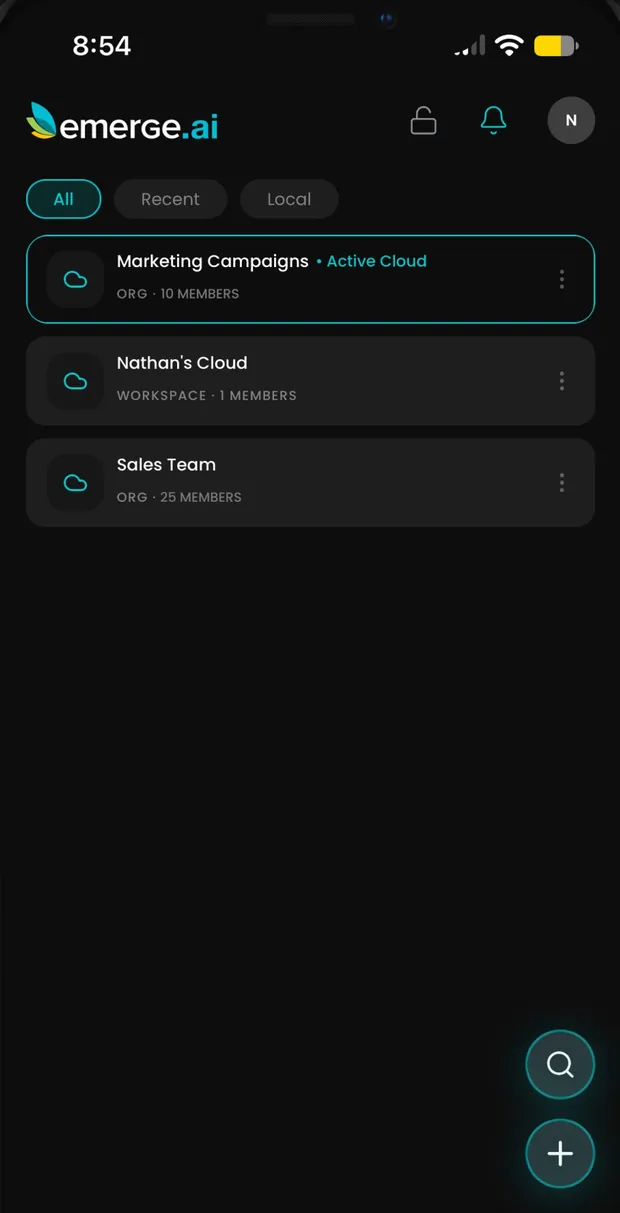
Switch between Clouds in Emerge.ai for iPhone.
A private AI Cloud Computer for your team
Emerge.ai clouds are like shared computers for you and your business group, or just for your private use. Each one has compute, models, privacy, policies, storage and everything you need to organize the different areas of your business and professional life.
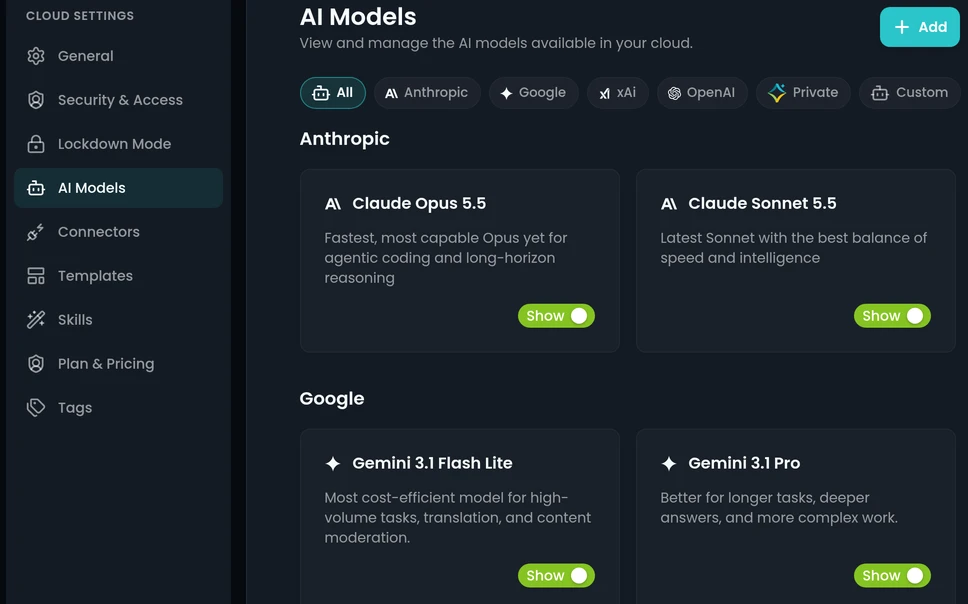
ComputeRuns on your device, your servers, Emerge or your hyperscaler.
ModelsChoose the AI models its members can use.
PrivacyEmerge.ai does not train on your data.
PoliciesMembers and roles decide who can do what.
StorageFiles private to your Cloud, in Emerge.ai Drive.
Run your clouds where you choose.
Emerge.ai clouds can run on your local device or your own servers, be hosted by Emerge, or run on the hyperscaler you already use.
On your device
Run a Local Cloud on your phone, or on your desktop with Simba Desktop. Your prompts and files stay on the device, online or offline.